

Choosing the right digital library software is no longer just a library decision. For schools, colleges, universities, public libraries, and government-led learning initiatives, it has become a broader decision about access, engagement, and digital learning infrastructure.
A few years ago, many institutions approached digital libraries as a way to digitize books or make library collections accessible online. In 2026, that definition is far too narrow. Institutions now expect digital library platforms to support curriculum-linked content, multilingual access, mobile learning, analytics, user management, and, increasingly, integration with the wider learning ecosystem.
That shift has changed what a useful digital library software list should do. It should not simply name tools. It should help institutions understand which platforms are best suited to their users, their operational needs, and their long-term learning goals.
In this guide, we have put together a practical digital library software list for 2026, covering some of the best platforms for schools, colleges, universities, libraries, and institutional learning environments. We also explain what digital library software actually does, which features matter most, and how to choose the right solution for your institution.
Quick Comparison: Digital Library Software List for 2026
| Platform | Best For | Platform Type | Deployment Style | Key Strengths | Watchouts |
|---|---|---|---|---|---|
| Mintbook | Schools, colleges, public libraries, government learning projects | Managed digital library platform | Managed / institutional deployment | Digital library + learning ecosystem fit, multilingual content, institutional deployment support | Best evaluated when the requirement extends beyond basic library automation |
| DSpace | Universities, research institutions, and academic repositories | Open-source repository platform | Self-hosted / partner-led | Strong for research repositories, scholarly content, and archiving | Not designed as a school-focused digital learning platform |
| Koha | Public libraries, school libraries, academic libraries | Open-source integrated library system | Self-hosted / partner-led | Cataloging, circulation, acquisitions, library operations | Stronger for library workflows than digital learning delivery |
| Greenstone | Digital collections, archives, academic projects | Open-source digital library software | Self-hosted / custom deployment | Searchable collections, multilingual support, multimedia archives | Can feel archive-oriented for institutions wanting a modern learner UX |
| Omeka | Museums, archives, and curated academic collections | Open-source collection publishing platform | Self-hosted / custom deployment | Digital exhibits, special collections, public-facing archives | Not a full digital library platform for institution-wide use |
| Invenio | Research repositories, technically mature institutions | Open-source repository framework | Self-hosted / custom deployment | Large-scale repository management, advanced customization | High implementation complexity |
| Follett Destiny Library Manager | K-12 school libraries | Managed school library platform | Vendor-managed | School library workflows, resource discovery, and administration | More library-management-focused than broader learning-platform-oriented |
| OPALS | School and institutional libraries | Library automation platform | Managed/hosted | School library management, online access, automation | Less suited to institutions seeking a broader digital learning infrastructure layer |
If you want to understand the category before comparing platforms, start with our guide on what digital library software is.
What Is Digital Library Software?
Digital library software is a platform that helps institutions create, organize, manage, and deliver digital content through a centralized online library. Depending on the institution, that content may include eBooks, journals, audiobooks, videos, question banks, research papers, teaching materials, training resources, and other multimedia learning content.
Modern digital library software goes well beyond simply hosting files. A strong platform can help institutions:
- Organize content using metadata and categories
- enable search and discovery across large collections
- manage users, permissions, and access
- track content usage and engagement
- support access across web and mobile devices
- deliver multilingual learning resources
- integrate with LMS or broader digital learning systems
In practice, digital library software can serve very different use cases. A university may use it as a research repository and academic content hub. A school may use it to give students access to curriculum-linked reading and self-learning resources. A public library may use it to extend access beyond physical branches. A government or NGO may use it to deploy learning content across multiple institutions, schools, or community learning centers.
That is why the best digital library software is not defined only by the size of the collection. It is defined by how effectively it supports access, discovery, administration, and learning outcomes.
Who Needs Digital Library Software?
A good digital library software list should reflect the fact that the category is no longer limited to traditional libraries. Today, digital library platforms are being evaluated by a much wider set of institutions.
Schools
Schools increasingly use digital library software to provide students with access to reading resources, curriculum-linked content, enrichment material, language learning content, and self-paced learning support. In many K-12 environments, the digital library is becoming part of a broader student learning experience rather than a standalone library project.
Schools evaluating library software for schools should think beyond circulation and cataloging alone. The real question is whether the platform can improve access to quality learning resources for students and teachers.
Colleges and Universities
Higher education institutions need digital library software that can support larger collections, multiple user groups, academic content access, research resources, and remote discovery. Depending on the institution, the requirement may range from a learner-facing digital library to an institutional repository or a hybrid model that combines both.
Public Libraries
Public libraries are increasingly using digital platforms to serve readers, students, job seekers, and lifelong learners beyond the physical library building. Digital library software helps them extend access, reach more users remotely, and offer resources across devices and locations.
Government, District, and Community Learning Projects
Government education programs, district library systems, smart city library initiatives, panchayat libraries, and social-impact projects often need digital learning infrastructure that can scale across multiple locations. These projects usually need more than just library automation. They need a platform that can support multilingual access, content delivery, reporting, and large-scale adoption.
Digital library infrastructure is also becoming increasingly relevant in rural and community contexts such as Gram Panchayat digital library initiatives, where the goal is not just to digitize content but to widen access to learning.
Enterprises and Training Organizations
Some digital library software platforms are also used by training institutions, corporate learning teams, and professional education environments that need a structured way to manage and distribute knowledge resources.
What Features Should You Look for in Digital Library Software?
Not every institution needs the same kind of platform, but some capabilities matter across most buying decisions. If you are using a digital library software list to shortlist vendors, these are the areas worth evaluating carefully.
1. Content Repository and Multi-Format Support
The first question is not “how many books does the platform support?” but “what kinds of learning resources can the platform manage and deliver?”
A strong digital library software platform should support a mix of formats, such as:
- eBooks
- journals and articles
- audiobooks
- videos
- PDFs and documents
- assessments and question banks
- interactive or multimedia learning resources
For many institutions, the quality and relevance of content are as important as the software itself. A platform that combines technology with a meaningful content ecosystem can create significantly more value than a tool that only manages records.
2. Search, Discovery, and Metadata
If students, faculty, librarians, or community learners cannot find relevant content quickly, the digital library will struggle with adoption. Good digital library software should support:
- advanced search
- filters by subject, grade, author, format, language, or topic
- metadata tagging
- clean navigation across collections
- recommendations or related-content discovery where relevant
Institutions that are evaluating platforms in depth should also review the core features of a digital library to understand which capabilities matter most for usability and adoption.
3. Multi-Device Access
Learners and educators increasingly access content across desktops, tablets, and mobile devices. A digital library should work well across devices and offer an intuitive experience for both administrators and end users.
4. Role-Based User Management
Most institutions need different permissions for students, teachers, librarians, administrators, departments, or external users. Role-based access, user segmentation, and admin controls are essential.
5. Multilingual Support
This is especially important for institutions serving diverse learner groups across India, Africa, Southeast Asia, and multilingual communities globally. Language accessibility can be a decisive factor in both adoption and impact.
6. Analytics and Reporting
Digital libraries are no longer just about making content available. Institutions want to understand what is being used, by whom, and how often.
Useful reporting features may include:
- active users
- most accessed content
- content consumption by subject or format
- usage by class, campus, department, or region
- learner engagement trends
7. LMS and Learning Ecosystem Integration
For many institutions, the digital library is not a standalone project. It is part of a broader learning environment. Depending on the use case, institutions may want to integrate the digital library with:
- LMS platforms
- virtual classroom tools
- single sign-on systems
- school ERP or student information systems
- assessment or learning analytics platforms
8. Scalability
A school with 500 users and a statewide library or education network with 50,000 users will have very different needs. Institutions should evaluate whether the platform can scale across campuses, branches, districts, or multiple institutions.
9. Offline or Low-Bandwidth Readiness
This matters in rural deployments, public library networks, and emerging-market education environments where internet connectivity may be inconsistent. In such cases, offline access or hybrid deployment becomes a major differentiator.
Digital Library Software List: 8 Best Platforms in 2026
Below is a curated digital library software list covering a mix of managed platforms, open-source systems, library management software, and repository tools. The goal is not to present every tool as interchangeable, but to help institutions understand which type of platform is best suited to their use case.
1. Mintbook
Best for: Schools, colleges, universities, public libraries, government learning projects, and institutions looking for a digital library platform that can also support broader learning infrastructure.
Mintbook is one of the strongest platforms in this digital library software list for institutions that need more than a basic repository or a conventional library management system. It is designed for schools, colleges, libraries, and large-scale learning environments that want to build a modern digital library experience while also creating the foundation for a broader learning ecosystem.
What makes Mintbook especially relevant is that it is not limited to digitizing books or managing a collection. It supports a wider institutional use case: enabling access to curated digital content, multilingual learning resources, and digital knowledge infrastructure across different types of educational environments. For institutions that are thinking beyond a standalone library and toward a more integrated learning environment, Mintbook offers a stronger strategic fit than many traditional tools.
Key strengths
- digital library platform designed for educational institutions, libraries, and public-sector learning deployments
- comes with 1M+ multi-format digital content, including eBooks, journals, videos, and learning resources embedded into the platform
- multilingual content access and institutional deployment capabilities
- suitable for schools, colleges, universities, libraries, and community learning initiatives
- strong fit for institutions exploring digital library + LMS or unified learning platform models
- relevant for large-scale and emerging-market deployments where accessibility, scale, and adoption matter
Best fit scenarios
- a school building a digital-first library for students and teachers
- a college or university modernizing access to digital academic resources
- a public library expanding access beyond the physical branch
- a district, state, or government-led learning initiative deploying digital content at scale
- an institution that wants a digital library today but also needs a pathway toward a unified learning platform
If your institution is evaluating digital library software not just as a library project but as part of a wider digital learning roadmap, explore Mintbook Digital Library.
2. DSpace
Best for: Universities, research institutions, academic repositories, and organizations that need an open-source institutional repository.
DSpace is one of the best-known open-source platforms in the academic repository world. It is widely used by universities and research institutions to store and provide access to theses, dissertations, research papers, journals, and institutional publications.
It is not designed primarily as a school digital library or a learner-facing educational content platform. Its strength lies in scholarly content preservation, repository workflows, metadata organization, and long-term access to academic assets.
Key strengths
- strong institutional repository capabilities
- widely used in higher education and research environments
- suitable for theses, dissertations, research papers, and archives
- metadata-rich content organization
- open-source and customizable
Considerations
- may require technical expertise for implementation and maintenance
- better suited to repositories than to school-style digital library experiences
- not ideal if the primary goal is learner engagement or curriculum-linked digital content delivery
3. Koha
Best for: Public libraries, school libraries, and academic libraries that need an open-source integrated library system.
Koha is one of the most established open-source library systems globally. It is widely used for cataloging, circulation, acquisitions, patron management, and reporting. It is an important platform in any broad digital library software list because of its adoption across library environments.
That said, institutions should be careful not to assume that a strong integrated library system automatically addresses the broader needs of a modern digital learning environment. Koha is strongest as a library operations platform rather than a learning-content platform.
Key strengths
- mature open-source integrated library system
- strong cataloging, circulation, acquisitions, and patron management capabilities
- widely adopted across public, academic, and school libraries
- supported by a large global community
Considerations
- strongest for library operations rather than digital learning experiences
- may need additional integrations or layers for rich digital content delivery
- not always the best fit for institutions seeking a digital library + learning platform model
4. Greenstone
Best for: Institutions and projects building searchable digital collections, archives, or multilingual content repositories.
Greenstone is a long-running open-source digital library software project focused on building and distributing digital collections. It supports multiple content formats and multilingual interfaces, making it useful for archives, collection-based projects, and academic digital library environments.
Key strengths
- purpose-built for digital collection creation
- supports multimedia content and searchable archives
- multilingual capabilities
- useful for academic and archival digital library projects
Considerations
- may feel more archive-oriented than learner-experience-oriented
- often requires technical support and customization
- not the best fit for institutions looking for a turnkey, modern SaaS-style digital library platform
5. Omeka
Best for: Museums, archives, humanities projects, and institutions creating curated digital exhibits or special collections.
Omeka is not a conventional school or college digital library platform, but it is useful for institutions that want to publish curated digital collections, public-facing exhibits, or specialized archives. Universities, museums, cultural institutions, and research centers often use it for project-specific collection experiences.
Key strengths
- excellent for curated digital collections and exhibits
- strong metadata orientation
- useful for archives, humanities projects, and special collections
- open-source ecosystem with plugins and extensions
Considerations
- not a complete digital learning platform
- not ideal for large-scale school or public library learning use cases
- better suited to curation and publishing than to institution-wide digital content delivery
6. Invenio
Best for: Research repositories, academic institutions, and technically mature organizations with complex repository needs.
Invenio is a repository-oriented open-source framework designed for large digital repositories and research collections. It is powerful and flexible, but best suited to institutions with the technical capacity to implement and maintain it.
Key strengths
- Robust repository and digital asset management capabilities
- Suitable for complex scholarly and institutional repositories
- Highly customizable
- Strong fit for research-oriented environments
Considerations
- Implementation complexity can be high
- Not ideal for institutions seeking a fast, managed digital library deployment
- Best suited to technically mature organizations
7. Follett Destiny Library Manager
Best for: K-12 school libraries.
Follett Destiny is a well-known platform in school library contexts, especially in K-12 education. It supports catalog management, library administration, and resource discovery for school environments. Schools that are primarily focused on library operations and access may find it relevant.
Key strengths
- designed with school libraries in mind
- supports school library workflows and resource discovery
- familiar to many K-12 library administrators
- useful for library administration and circulation
Considerations
- stronger in school library management than in broader digital learning infrastructure
- institutions looking for digital library + content ecosystem + learning integration may need a more expansive platform
- content strategy and long-term platform flexibility should be evaluated carefully
8. OPALS
Best for: School and institutional libraries looking for library automation with online access.
OPALS is another platform used in school and institutional library settings. It focuses on library automation, digital access, and ease of use, especially for schools that want to modernize their library operations.
Key strengths
- supports school and institutional library workflows
- includes library automation and online access capabilities
- easier for many institutions to adopt than highly technical repository tools
- useful for day-to-day library management
Considerations
- more library-management-focused than learning-platform-focused
- may not address advanced digital content strategy or LMS integration needs
- better suited to library modernization than to broader learning infrastructure transformation
Open-Source vs Managed Digital Library Software: Which Is Better?
A good digital library software list should not treat every platform as equivalent. Open-source repository tools, library management systems, and managed institutional digital library platforms solve different problems.
Choose open-source digital library software if:
- You have an in-house technical team or a trusted implementation partner
- Your use case is repository-led, archive-led, or library-operations-led
- You want greater control over customization and infrastructure
- You are comfortable managing hosting, maintenance, upgrades, and integrations
Choose managed digital library software if:
- You want faster deployment and lower operational complexity
- You need a platform that comes with implementation and support
- content quality, user experience, and adoption are as important as backend control
- Your institution wants a digital library that can evolve into a broader learning platform
- You do not want internal teams spending time maintaining open-source infrastructure
For many schools, colleges, public libraries, and government learning initiatives, managed digital library software is often the more practical choice because the challenge is not only software deployment. It is long-term adoption, content quality, reporting, user engagement, and alignment with institutional outcomes.
How to Choose the Right Digital Library Software for Your Institution
One of the biggest mistakes institutions make is comparing every platform in a digital library software list using the same checklist. A university repository, a school library platform, and a district-wide digital learning initiative may all fall under the broad digital library category, but their needs are not identical.
Here is a better way to evaluate options.
If you are a school
Prioritize:
- age-appropriate and curriculum-aligned content
- easy access for students and teachers
- mobile compatibility
- multilingual support
- simple administration for school staff
- the ability to support reading, assignments, enrichment, and self-learning
Schools comparing vendors should think beyond library automation alone and ask whether the platform can genuinely improve student access to learning resources.
If you are a college or university
Prioritize:
- content organization at scale
- repository and academic content access requirements
- remote access and authentication
- support for multiple departments and user groups
- research content, course-linked materials, and digital collections
- analytics and reporting
- LMS or campus system integration where relevant
If you are a public library
Prioritize:
- ease of use for diverse user groups
- remote access beyond the physical library
- multilingual content discoverability
- digital lending or access capabilities
- scalability across branches or districts
- support for lifelong learning, skilling, and community education
If you are implementing a government or community learning project
Prioritize:
- scalability across multiple institutions or geographies
- low-bandwidth or offline readiness
- centralized administration and reporting
- multilingual content access
- relevance across different learner segments
- implementation support and long-term sustainability

When a Unified Learning Platform Makes More Sense Than a Standalone Digital Library
This is one of the most important strategic questions institutions should ask in 2026.
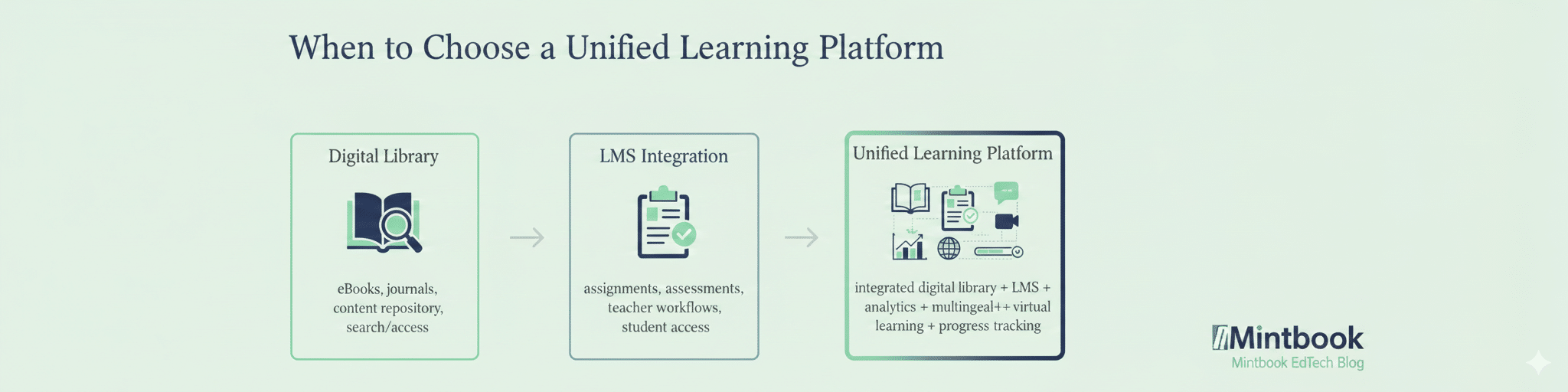
If your goal is simply to digitize access to books, journals, or documents, a standalone digital library platform may be enough. But if your institution is trying to improve learning access, engagement, completion, and outcomes, the digital library may need to sit inside a larger learning ecosystem.
That is where a unified learning platform becomes relevant.
A unified learning platform combines digital content access with additional layers such as:
- LMS capabilities
- assessments and quizzes
- assignments and structured learning journeys
- virtual classrooms
- learner tracking
- analytics and reporting
- workflows for teachers, librarians, and administrators
- also provides access to ebooks and e-resources
For schools, colleges, and large learning ecosystems, this model is increasingly more useful than stitching together disconnected tools. If your institution is currently comparing a digital library with a learning management system or a broader integrated environment, it is worth exploring the mintbook unified learning platform.
Why Many Institutions Are Moving Beyond the Traditional “Library Software” Mindset
Historically, the conversation around library technology centered on cataloging, issuing, returning, and preserving resources. Those functions still matter, but institutions are now trying to solve a broader set of challenges:
- How to make quality content available anytime, anywhere
- How to support multiple content formats beyond books
- How to improve self-paced access and learner engagement
- How to serve users across devices and geographies
- How to support multilingual and inclusive learning
- How to integrate content access into wider digital education workflows
This is why the digital library category itself is evolving. In many cases, the real decision is no longer “which software should manage the library?” but “which platform can best support access to knowledge and learning at scale?”
That distinction changes the shortlist. It also changes how institutions should interpret any digital library software list. The best platform is not always the one with the longest feature list. It is the one that aligns with the institution’s educational model, user needs, and long-term digital strategy.
Frequently Asked Questions About Digital Library Software
What is the difference between digital library software and a library management system?
A library management system is often focused on library operations such as cataloging, circulation, acquisitions, and patron management. Digital library software is broader and can include online content delivery, remote access, multimedia learning resources, search and discovery, analytics, and integration with digital learning tools.
Which digital library software is best for schools?
The answer depends on whether the school only needs library administration or wants a broader digital learning platform. Schools that want curriculum-linked digital content, multilingual access, and support for self-paced learning should look beyond traditional catalog systems and evaluate full digital library platforms.
Is open-source digital library software a good option?
Open-source software can be a strong option for universities, repositories, archives, and technically mature institutions. But for many schools, public libraries, and multi-site learning deployments, a managed platform may be easier to implement, scale, and sustain.
Can digital library software integrate with an LMS?
Yes. Many modern platforms either integrate with an LMS or are designed to work as part of a broader digital learning environment. This is especially important for institutions that want to connect content access with teaching, assignments, and learner engagement.
What should public libraries look for in digital library software?
Public libraries should look for ease of use, digital access beyond the physical library, multilingual support, strong search and discovery, community-friendly access, and the ability to serve multiple learner segments.
Is digital library software useful only for educational institutions?
No. While schools, colleges, and libraries are the most common users, digital library software can also be used by government projects, training organizations, NGOs, and enterprises that need to manage and distribute learning or knowledge resources digitally.
Conclusion: Choosing the Right Digital Library Software in 2026
The best digital library software is not necessarily the one with the longest feature list. It is the one that matches your institution’s learning goals, user base, operational capacity, and long-term digital strategy.
For some institutions, that will mean an open-source repository or a library management system. For others, especially schools, colleges, public libraries, and large-scale learning initiatives, it may mean choosing a platform that goes beyond digitization and supports a more complete learning environment.
That is why a digital library software list should be used as a starting point, not the final answer. The more important decision is what kind of learning infrastructure your institution wants to build over the next few years.
If your institution is exploring how to build a modern digital library for schools, colleges, universities, or public learning environments, the next step is to evaluate whether you need a standalone library system, a managed digital library platform, or a unified learning platform that can support your digital learning goals over the long term.
Looking for a digital library platform built for modern institutions?
Mintbook helps schools, colleges, libraries, and learning ecosystems build digital libraries that go beyond content storage, with multilingual resources, institutional deployment support, and a pathway toward unified learning infrastructure.
Explore Mintbook Digital Library
